


Key Takeaways
- AP automation eliminates manual errors across the entire invoice-to-pay workflow — from bill capture to reconciliation.
- Finance teams gain real-time visibility into payments, cash flow, and vendor spending without the manual effort.
- It integrates with your existing accounting software — making adoption seamless and cost savings immediate.
What if your finance team could process hundreds of invoices, approve payments, and reconcile accounts without manual errors, endless emails, or delays? That’s exactly what accounts payable automation makes possible.
Accounts payable (AP) is a crucial function for companies, determining the efficiency of purchase workflows, supplier relationships, and overall finance operations. But it’s often complex and error-prone, involving repetitive tasks like processing large volumes of vendor bills, updating statuses, maintaining supplier communication, and reconciling payments.
Mistakes or delays in AP can have serious consequences. That’s why smarter companies—big and small—are turning to accounts payable automation. By digitizing and streamlining invoice-to-pay processes, AP automation ensures faster processing, fewer errors, and reduced operational costs, while giving finance teams real-time insights and more time for strategic activities.
What Is Accounts Payable Automation?
Accounts payable automation digitizes the entire invoice-to-pay workflow using technologies like AI and OCR. Instead of manually entering invoice data, AP automation:
- Captures and validates invoice information automatically
- Matches invoices with purchase orders and receipts
- Routes approvals seamlessly through predefined workflows
The results are tangible: faster processing, improved accuracy, stronger compliance, and better vendor relationships. Finance teams can now focus on high-value work while gaining clear visibility into cash flow, spending trends, and supplier performance.
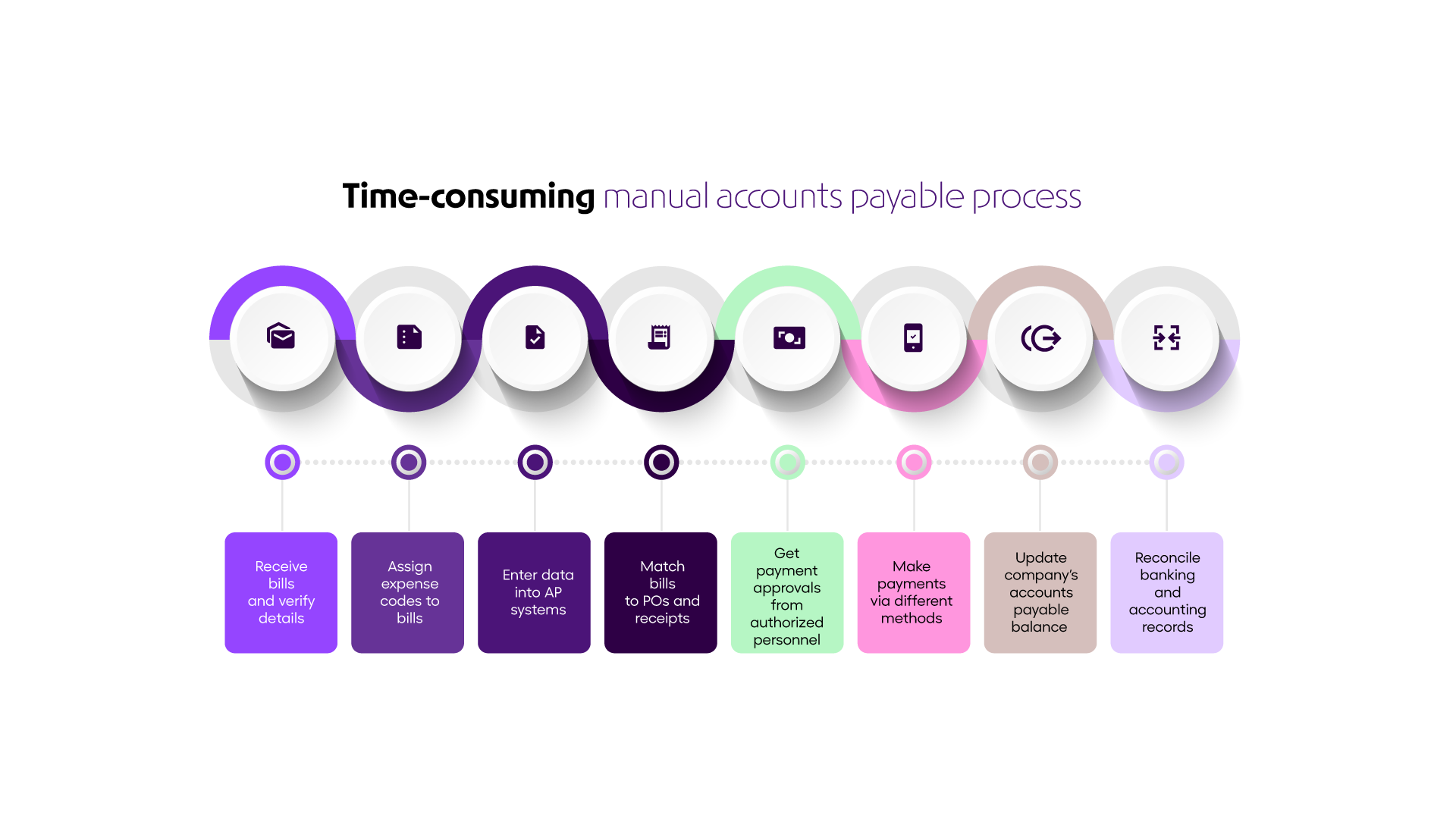
Along with being complicated, it’s also a high-stakes task. Meaning, in case the accuracy or pace of the work is compromised, it could have dire consequences for the company.
This explains why smarter companies, big and small, are choosing to automate the accounts payable workflow/systems. This helps them with seamless processing of bills and analytics, faster turnaround time, and reduced operational costs and data risks.
Through this article, we intend to serve one purpose for you: leaving no gaps in your understanding of accounts payable automation and throwing light on what it can do for you.
Accounts Payable Automation Process
Here’s an elaborate list of all that accounts payable automation does to transform your AP system. Let’s dive in:
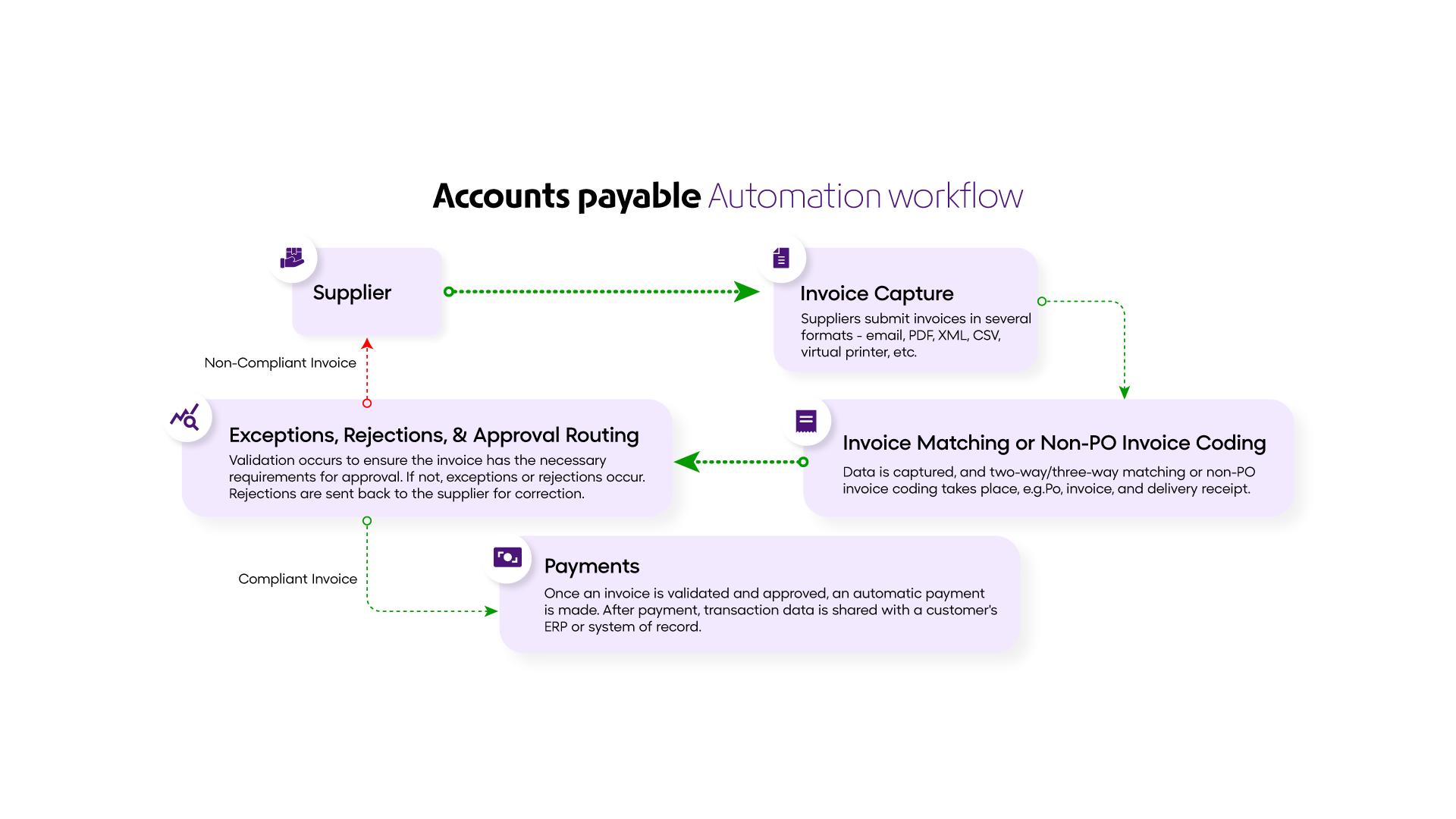
(i) Bill Capture:
Bill Capture is the initial process of capturing (extracting) data from the bills generated & shared by suppliers or vendors. The accurate and efficient flow of these data sets sets the AP workflow in motion. However, more often than not, the bills that your AP team receives are scattered between emails and physical bills, calling for copious amounts of manual entries. This not only hinders productivity but also leaves room for mistakes, bill losses, and restricted visibility of the whole process.
An end-to-end AP automation software will swiftly and accurately extract data from bills of all formats, re-align them to usable, structured, and classified data, and automatically import all the entries into the AP system with minimal to no human assistance.
(ii) Data Extraction and Validation:
The AP team has to consistently extract all useful information from the bills and documents, validate it against the source documents, and also make sure that they adhere to a predefined standard that ensures the accuracy and usability of this data throughout the process.
When dealing with copious volumes of data regarding the price, quantity, and resources that often differ only slightly from each other, the team tends to make several negligence errors.
Once automated, the system efficiently and instantly extracts all the required key information from the bills (physical and digitized), validates it against the source documents, and also makes sure that the pre-set standards are followed without any inconsistencies or gaps.
(iii) Matching Bills to Purchase Orders:
Matching bills to purchase orders is another error-prone and time-consuming task, where the purchase orders must be compared against their supporting documents before processing and releasing the payments. This process imposes cognitive stress on the AP team, as every payment is preceded by a document verification process and recording of several details from the bill, like amount, quantity, receiver, reception date, value of the resource, and any other details as required by the particular team.
These bills go through multiple (three to four) stages of approval, and after each of these stages, the bill details must be verified once again to ensure consistency.
Manual bill-matching processes can result in several price and quantity discrepancies.
An AP automation system can automatically match the bill at all stages, including the purchase orders, receipt notes, and inspection documents, with almost accuracy and seamless pace.
(iv) Workflow Routing:
Accounts payable runs on a rather complex and dynamic workflow that requires efficient communication and cooperation among team members and teams from other companies.
The primary core processes here include:
- Receiving the bill from the supplier
- Verifying data, validating, and maintaining records
- Flagging discrepancies and inconsistencies, and correcting them before approval
- Settling the payments,
An automated AP workflow will transform this dynamic process into a single and easily manageable console that will automatically trigger real-time notifications to appropriate personnel regarding the flagged errors, approval requests, and more, which they can digitally respond to and simultaneously update the entire team about the status of each bill. The system can even assign tasks to individuals and record their completion, eradicating the need for personalized communications, phone calls, and meetings, and micro-managing each stage of the process.
(v) e-statement Reconciliation:
Even though AP teams’ primary function is to calculate and deliver all the due supplier payments on time, it is sometimes humanly impossible to ensure that the general ledger and AP balances are accurate. The team could take several weeks or monthly payment cycles before these errors are caught, flagged, and redressed/remedied.
Automating this process would imply that the system can automatically import item details from the bills directly through the source systems and match them with the e-statements of linked bank accounts based on the predetermined matching rules. This also allows the team to access all the e-statements and other details through a consolidated panel for a transparent and smooth process.
(vi) Integration with Accounting Software
An automated AP system also offloads the team from updating the bill data separately on the accounts software, as the AP system is already integrated with the company’s internal account software. This is a fairly simple but tedious process when assigned in high volumes, that tire the team members and exhausts their potential on a repetitive and mechanical task. Automating this process ensures that the general ledger is updated automatically and simultaneously.
Read more: Finance Automation and Its Critical Role in Streamlining Financial Processes
(vii) Payment Processing:
Payment processing is a core process of AP teams, and automating it relieves the team from any additional pressure to facilitate payment processes manually, seeking updates of receipt from the suppliers, and then closing the tab on each particular payment.
AP automation tools are fully facilitated to take over the payment process. The system can enhance the team’s efforts further by providing a consolidated and interactive dashboard of pending payments. This fast-tracks the communication, decision-making, and cash flow management for the businesses.
(viii) Reporting and Analytics:
Since the AP automation software is linked to the current accounts and has all the vendor or supplier bill data, it can automatically read the numbers together and generate easy-to-interpret reports of several metrics like outstanding bills and dues, payment timelines and cycles, supplier spending, and much more.
These reports not only help their teams make better decisions and analyze their performance and scope of improvement but also give valuable inputs that can help the overall AP process negotiate for better terms with suppliers and enhance cash flow management.
(ix) Security and Compliance:
AP teams deal with sensitive data that must be protected against breaches, losses, and any other system storage vulnerabilities. Companies that outsource the AP process are at a higher risk of cyber threats. Even companies that nurture internal teams are often subject to fraud, misplacements, and losses of digitized bills and documents, leading to monetarily heavy consequences for the company.
Modern AP automation solutions incorporate security measures to protect sensitive financial data, with network and data encryption, intrusion detection and prevention tools, and frequent cloud backups.
What are the benefits of Accounts Payable Automation?
Automating the accounts payable (AP) process delivers value across the organization—from finance and accounting teams to procurement, top-level management, and even suppliers. By replacing manual workflows with digital automation, companies can achieve efficiency, accuracy, and strategic insight.
Here’s what a modern AP automation system can do:
1. Save Time and Reduce Costs
Eliminates manual data entry and document handling, saving your team hours every week. Costs associated with printing, storing, and mailing invoices are also reduced.
2. Improve Accuracy and Reduce Errors
Smart tools like AI-powered data capture and OCR ensure invoices and bills are processed correctly, reducing human errors and discrepancies.
3. Enhance Visibility and Control
Centralized dashboards provide real-time updates on payments, outstanding bills, and approvals, empowering teams to make faster, informed decisions.
4. Accelerate Processing and Approvals
Automated workflows streamline communication, verification, and invoice matching, delivering faster processing cycles and quicker approvals.
5. Strengthen Vendor Relationships
Automation ensures timely, accurate payments, creating transparency and building trust with suppliers and vendors.
6. Gain Strategic Insights
Collating data from all AP activities allows teams to analyze payment trends, forecast cash flow, and identify areas for process improvement.
Finance automation is transforming the way companies operate, and CFOs are leading the change. If you want to dive deeper into business finance automation, discover emerging trends, and see how top finance leaders are evolving, download our free eBook today.
Conclusion: Transform Your AP with Automation
Accounts payable automation turns a tedious, high-risk function into a strategic advantage for your organization. Companies worldwide are leveraging automated AP systems to boost efficiency, reduce errors, and free finance teams to focus on high-value work.
Curious how automation can work for your business? With OPEN, you can implement a fully automated, error-free AP workflow that your team and vendors will trust.
Take the next step:
Explore how OPEN’s AP automation platform can streamline your invoice-to-pay process, improve accuracy, and enhance visibility across all accounts.
Frequently Asked Questions (FAQs)
1. What is automation in accounts payable?
Accounts payable (AP) automation is the application of technology that shifts manual invoice and payment tasks to digital systems that do not require human intervention. Such tasks may include invoice receipt, invoice matching, approval routing, payment origination, reconciliation, and reporting.
2. What is the 3-way PO process?
The 3-way PO process, or three-way matching, is an AP control that verifies a supplier’s invoice against the original Purchase Order (PO) and the Goods Receipt Note (GRN) (or receiving report). This ensures that what was ordered, received, and billed all match before payment is approved, reducing errors and preventing fraud. Any discrepancies trigger a hold and investigation before payment is processed.
3. How does AP automation improve efficiency?
AP automation reduces manual work, speeds up invoice processing, and minimizes errors. By digitizing invoice capture, validation, and approval workflows, finance teams can process more invoices in less time, free up staff for strategic tasks, and maintain better visibility into cash flow and vendor payments.
4. Is AP automation secure for sensitive financial data?
Yes. Modern AP automation platforms include data encryption, access controls, audit trails, and compliance features to protect sensitive financial information. Automated workflows also reduce human handling, lowering the risk of errors, fraud, or data breaches while ensuring regulatory compliance.