

Picture this. It’s the last week of the month. Your accounts payable team has 340 invoices to process. Forty-two vendors are following up on payments. Three invoices have different amounts on the PO and the bill. One vendor has sent a revised invoice with the same invoice number as the original. And somewhere in that pile, a duplicate is hiding—same invoice, submitted twice from two different email addresses.
This is not an unusual month. This is every month.
The problem isn’t effort. The problem is that the first step in the entire accounts payable (AP) workflow—getting invoice data out of a document and into your system—is still largely manual. And everything downstream is only as fast as that first step.
Automated invoice capture is how you fix the first step. Here’s how it works, what the technology has gotten right, and where businesses still lose time.
What Is Invoice Capture — and Why Is It the First Bottleneck in AP?
Invoice capture is the process of automatically extracting structured data from an invoice—vendor name, GSTIN, invoice number, line items, tax amounts, due date, and totals—and feeding it directly into your AP or accounting system.
It sounds easy until you look at real invoices.
They are not clean, structured data. They are PDFs, scans, images, and email attachments from thousands of vendors.
Extracting the right data from them, consistently and at scale, is hard.
This is why invoice capture is the first bottleneck in AP. Everything else—validation, matching, approval, payment—can only move as fast as data arrives. When that first step is manual, the entire pipeline slows down.
The goal of automated invoice capture is to make that first step disappear. Not faster—gone. Your team should spend their time reviewing exceptions and managing vendor relationships, not typing numbers from a PDF into a spreadsheet.
How Traditional OCR Works (and Where It Falls Short)
OCR invoice processing is the foundation of automated invoice capture. OCR—Optical Character Recognition—converts images and scanned documents into machine-readable text. It’s been the backbone of document digitization for decades.
Here’s how it works at a basic level:
- An invoice arrives—as a scanned PDF, a photograph, or a digital document.
- The OCR engine analyzes the image pixel by pixel.
- It identifies shapes that correspond to known characters—letters, numbers, punctuation.
- It converts those shapes into text that the system can read and process.
One distinction worth understanding upfront: not all PDFs need OCR. A PDF generated directly from accounting software contains selectable, embedded text—OCR isn’t needed. A PDF that’s a scanned photograph of a printed invoice needs full OCR processing. The latter is slower, harder to read accurately, and more likely to produce errors. If you can get your vendors to send digital-native invoices, it’s worth asking.
Where traditional OCR falls short
OCR reads text. It doesn’t understand it. After OCR runs, you have a block of text—but the system doesn’t know which number is the invoice total, which is the tax amount, and which is a product code.
Early systems solved this with templates. You’d map a vendor’s invoice layout once—’ the total is always in this position, the invoice number is always here’—and the system followed that map every time.
Templates work until they don’t. Change the invoice format, onboard a new vendor, receive an invoice with an extra line item, and the template breaks. Someone has to fix it manually. For a business with 200 active vendors, that’s a maintenance burden.
Rules-based extraction was the next step up: logic like ‘find the number following “Invoice No.” and treat it as the identifier.’ This handles more variation, but edge cases still slip through—unusual layouts, mixed-language invoices, non-standard tax line items.
The result: traditional OCR invoice processing gets you partway there, then hands the problem back to a human.
How AI and ML Improve on Basic OCR
This is where modern invoice capture really helps.
AI invoice scanning does not depend only on fixed rules. It learns from patterns across many real invoices.
That means it can identify common fields like totals, vendor names, line items, GSTIN, and PAN—even when the layout changes.
The real benefit: when a new vendor sends an invoice in a new format, the system can still extract the data without manual template setup. If something is unclear, it flags it for review.
Confidence scores: how the system knows when to automate and when to escalate
When an intelligent document processing system extracts a field, it doesn’t just output a value—it assigns a confidence score. A high score (95%) means the system is confident. A low score (55%) indicates uncertainty.
This allows businesses to define operational thresholds:
- High-confidence extractions can be processed automatically, and
- Low-confidence extractions can be routed for human review.
This approach enables scale without compromising accuracy. Automation is applied where confidence is high, while review is reserved for exceptions.
Leading systems also improve with feedback. When users correct low-confidence fields, those corrections help improve future extraction performance on similar invoice formats.
Most tools look good on headers. The real difference shows up in line-item extraction.
Most invoice explainers miss this: extracting header fields and extracting line items are very different problems.
Header fields—like vendor name, invoice number, date, and total—usually appear once and in familiar locations. Most tools can capture these well.
Line items are a different story.
Rows may wrap, columns may shift, cells may be merged, and descriptions may be split across lines. On top of that, quantities, prices, and taxes still need to match correctly.
This is where invoice capture tools actually separate from each other.
If you are comparing tools, ask for line-item accuracy specifically. An overall accuracy score may look good while line-item extraction is still weak.
Invoice Capture Methods: Email, Portal, EDI & e-Invoice Feeds
Invoice capture is not only an extraction problem. It is also an ingestion problem.
Invoices can arrive through several channels, and a well-designed automation setup should support all of them.
Email ingestion remains the primary channel for many businesses. Invoices are received as PDF attachments in shared AP mailboxes and processed automatically through monitored inbox workflows.
Vendor portals provide a more structured submission path. This usually improves consistency, which in turn improves extraction accuracy and reduces exception handling.
EDI (Electronic Data Interchange) is common in enterprise supply chains. Invoices are transmitted as structured files (for example, EDIFACT or X12), which removes the need for OCR-based extraction.
GST e-invoice feeds via the IRP are a major advantage for Indian AP teams. For applicable businesses, invoices are registered with the Invoice Registration Portal (IRP), which returns an Invoice Reference Number (IRN) and QR code.
This allows AP systems to validate invoice authenticity earlier in the process. Solutions that validate IRN details or consume e-invoice data directly can reduce manual extraction effort and detect non-compliant invoices sooner.
What Happens After Capture: Validation, Matching, and Routing
Capturing invoice data is only the starting point. Before an invoice moves to approval, the system needs to validate the data, match it against procurement records, and route it correctly.
Validation
A good AP automation workflow runs checks on every invoice, including:
- line-item and subtotal consistency,
- GST calculation checks,
- GSTIN validation,
- invoice date checks, and
- duplicate invoice detection.
Duplicate detection is especially important because duplicate submissions are a common cause of overpayments. These can happen due to vendor resubmissions, payment follow-ups, or manual mistakes.
Automated validation helps catch these issues early.
Three-way matching
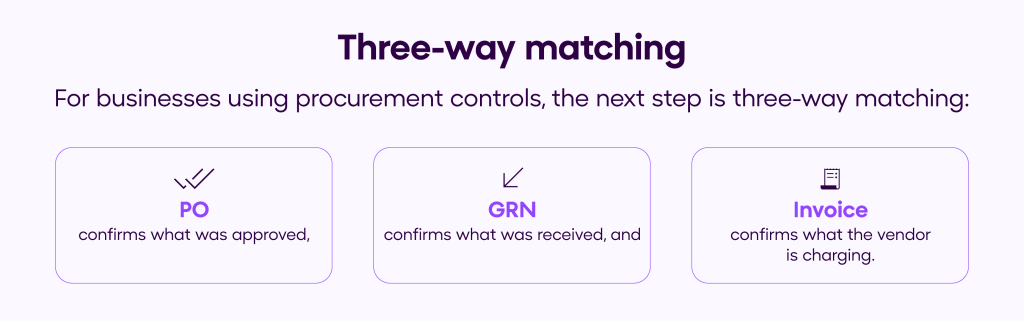
For businesses using procurement controls, the next step is three-way matching:
- PO confirms what was approved,
- GRN confirms what was received, and
- Invoice confirms what the vendor is charging.
When these records match, the invoice can be approved faster. When they do not, the system flags the mismatch for review.
This saves finance teams a lot of manual work. Instead of checking every invoice by hand, they review only the exceptions.
Routing and approval workflows
Capturing an invoice does not mean it is ready to pay.
Many invoices still need approval. A good system sends each invoice to the right person automatically based on rules like amount, vendor, department, or cost center.
And when approvals can happen on mobile, email, or a simple web page, invoices move faster instead of getting stuck in inboxes.
The Metrics That Show If Your AP Workflow Is Working
Capture Accuracy
Track separately for header fields and line items. Overall accuracy scores can hide weak line-item extraction, which is where most errors occur.
Exception Rate
Due to extraction uncertainty, validation failures, or matching issues. A high exception rate usually signals workflow or data quality problems.
STP Rate (Straight-Through Processing)
One of the clearest indicators of AP automation maturity. Many high-performing teams target a 60%+ STP rate as a strong baseline milestone.
Cost & Time Per Invoice
Automation should significantly reduce this compared to manual workflows. Benchmarking helps teams track efficiency improvements over time.
Strong AP teams don’t just automate invoice capture—they measure how well it performs. Tracking these metrics helps identify where automation is working and where workflows still need improvement.
What to Look for in an Invoice Capture Solution
There are plenty of invoice capture tools in the market. The easiest way to compare them is to look at what happens in real AP workflows—not just demo screens.
| Capability | What to Check |
| Multi-channel ingestion | Supports email, vendor portal uploads, and IRP e-invoice flows so invoices from every source are captured automatically. |
| Line-item accuracy | Ask for separate accuracy metrics for header fields and line items. Overall accuracy numbers can be misleading. |
| GST & IRP validation | Built-in checks like GSTIN validation, IRN validation, and exception flags for invoices that need review. |
| Confidence scores | The system should flag low-confidence fields and route them for review instead of silently pushing them forward. |
| ERP & workflow integration | Extracted invoice data should move directly into ERP, accounting, or payment workflows without retyping. |
| Learning from corrections | When teams fix exceptions, the system should learn and improve accuracy over time. |
Bottom line:
The fastest AP teams usually start with clean invoice capture. Fix the input, and the rest of the AP workflow becomes much easier.
That’s where the real impact comes from—connecting invoice capture directly to approvals, payments, and reconciliation.
OPEN connects automated invoice capture with business payments and connected banking—so your invoices don’t just get processed, they get paid. See how finance teams are cutting invoice-to-payment time by over 70%.
FAQs
1. What is automated invoice capture?
Automated invoice capture is the process of extracting key data from invoices—such as vendor name, invoice number, GSTIN, line items, tax amounts, and totals—and sending that data directly into an accounting or accounts payable (AP) system. Instead of manually typing invoice details from PDFs or scanned documents, the system uses technologies like OCR and AI to read and structure the information automatically.
2. How is AI-based invoice capture different from traditional OCR?
Traditional OCR converts images or scanned invoices into machine-readable text, but it does not understand what the text represents. AI-based invoice capture goes a step further by identifying patterns across many invoices and recognising fields like invoice totals, vendor names, GST numbers, and line items, even when layouts change. This reduces the need for manual templates and improves accuracy across different invoice formats.
3. Why is line-item extraction important in invoice processing?
Many invoice capture tools can extract header fields like invoice number, date, and total amount. However, line-item extraction is more complex because invoices often have multiple rows, changing column layouts, and wrapped descriptions. Accurate line-item extraction is important for validating quantities, prices, and taxes—especially when invoices need to be matched against purchase orders or goods received notes.
4. What happens after invoice data is captured?
After invoice data is captured, the system typically runs validation checks, matches the invoice with procurement records, and routes it for approval. Common checks include GST validation, duplicate invoice detection, subtotal verification, and three-way matching with purchase orders and goods received notes. Once validated and approved, the invoice can move forward for payment processing.