
Managing vendor payouts is fundamental to running any business that collaborates with suppliers, partners, or service providers. While paying vendors on time and with precision is essential, many businesses still rely on manual processes that are complex and error-prone. This not only drains resources but also risks damaging professional relationships.
The good news? There’s a smarter way forward. Businesses that automate payouts consistently save time, reduce errors, and free up their teams to focus on higher-value work. In this comprehensive guide, we’ll walk you through the common challenges of manual vendor payments and give you a clear, five-step roadmap to automate your vendor payout process with confidence.
What Is Automated Vendor Payout?
Automated vendor payout is the process of using software to manage your entire vendor payment cycle from invoice receipt to final payment without manual intervention at every step.
Instead of spreadsheets and manual bank transfers, automation tools handle invoice validation, tax deductions like TDS, and payment processing through modes like NEFT, IMPS, or UPI. Once payments go out, the system reconciles transactions automatically, giving your team real-time visibility into what’s paid and what’s pending.
Challenges of Manual Vendor Payouts
Why Businesses Are Choosing to Automate Vendor Payouts
If you’re still using spreadsheets and manual processes to handle vendor payments, you’re probably familiar with these common challenges:
- Time-consuming tasks: Sorting through invoices, verifying payment details, and processing each transaction manually can take up hours of your team’s time. This slows down payments and pulls resources away from more important tasks.
- Prone to errors: A simple typo or missed detail can lead to incorrect payments, causing delays and frustrating your vendors. Fixing these errors takes extra time and effort, creating unnecessary stress.
- Limited visibility: Without a streamlined system, it’s tough to track payment statuses. This leaves vendors and internal teams uncertain about where things stand, which can cause confusion and strain in relationships.
- Scalability issues: As your business grows, so does the number of vendor payments. What worked for a few vendors quickly becomes inefficient and overwhelming as your vendor base expands.
These challenges not only slow things down but can also damage relationships with your vendors. Automation can solve these problems, making the payout process smoother, more reliable, and more efficient.
Why Automating Vendor Payouts Matters
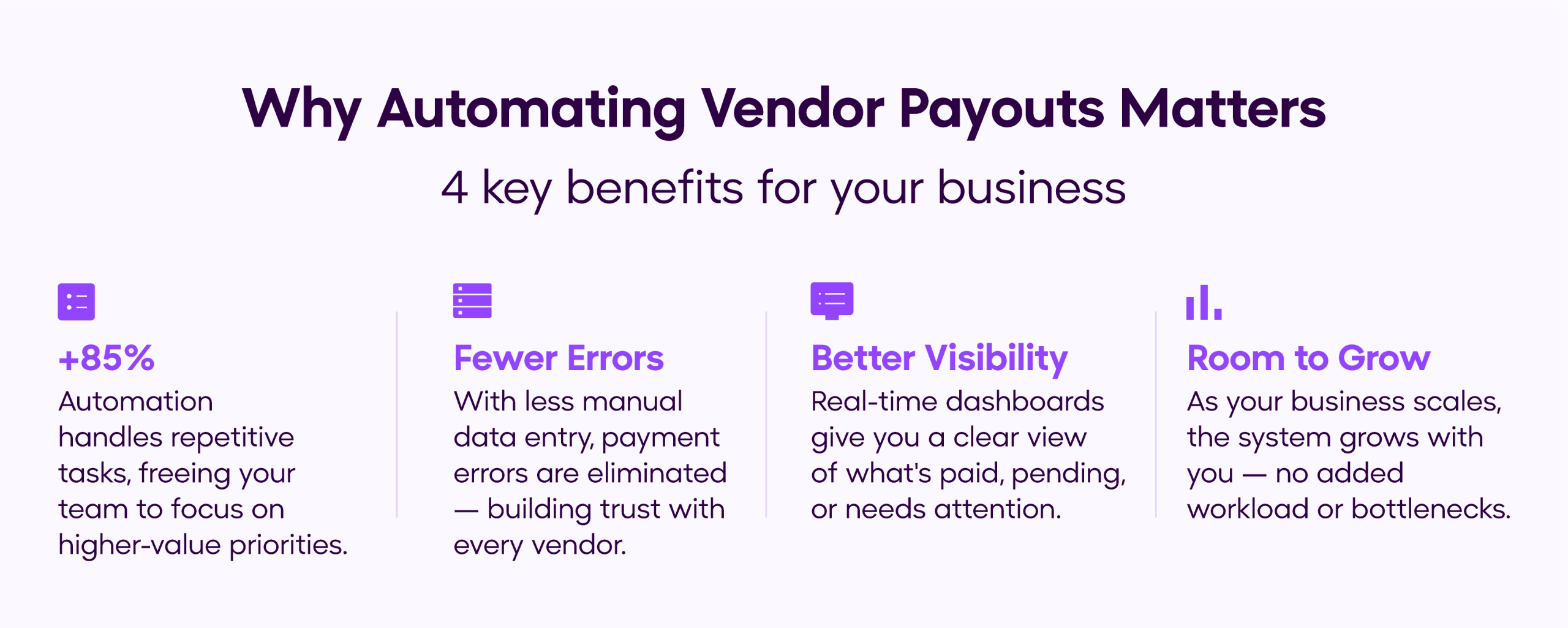
- Boosted efficiency: Automation takes care of repetitive tasks, freeing up your team to focus on bigger priorities. Think about having more time to strengthen supplier relationships or negotiate better contracts.
- Fewer errors: With less manual data entry, mistakes like typos or payment mix-ups have become a thing of the past. Your vendors get paid accurately, which strengthens trust and reinforces your reputation as a dependable partner.
- Better visibility: Automation tools often provide dashboards and reports, giving you and your vendors real-time payment updates. Clear communication means fewer follow-up questions and stronger working relationships.
- Room to grow: As your business expands, automated systems can handle more payments without added stress or complexity, keeping your processes smooth no matter how large your vendor base gets.
By automating your payouts, you’re not just streamlining operations—you’re setting the foundation for better efficiency and stronger vendor partnerships. Let’s look at how to make the switch step by step.
Step-By-Step Guide to Automating Vendor Payouts
1. Evaluate your current process
Start by mapping out your current vendor payout workflow. Pinpoint challenges such as bottlenecks, frequent errors, time inefficiencies, or high resource costs. This process highlights inefficiencies and sets clear objectives for automation. By understanding these issues, you can make targeted improvements to save time, reduce errors, and optimize resources.
Questions to consider during evaluation:
- How much time does your team spend on vendor payments?
- What types of errors occur most frequently?
- Are your vendors happy with the way your current process works?
What is the actual cost of maintaining it?
Answering these questions provides a clear picture of the gaps that automation can fill.
2. Choose the Right Tools
Look for payout automation platforms that suit your business size and needs. Popular options include tools that integrate with your accounting software, support multiple payment methods, and provide tracking features. Ensure the tool you choose offers robust security and compliance features.
Features to prioritize:
- Effortless integration with existing systems like ERP or accounting software.
- Support for international payments and multiple currencies.
- Automated notifications for vendors about payment status.
Researching and selecting the right tool is a critical step that can make or break your automation efforts.
3. Standardize Vendor Information
Before implementing automation, standardize the way you collect and store vendor information. This includes bank details, tax identification numbers, and preferred payment methods. Consistency reduces errors and makes automation seamless.
Best practices for standardization:
- Use a centralized database to store vendor details.
- Verify information with vendors regularly to ensure accuracy.
- Implement a secure system for data storage to protect sensitive information.
A standardized approach ensures that your automation system works smoothly from the outset.
4. Integrate with Existing Systems
Automation tools work best when integrated with your existing software, such as accounting or enterprise resource planning (ERP) systems. This ensures smooth data flow and eliminates the need for manual data entry.
Steps for successful integration:
- Check compatibility between your chosen automation tool and current systems.
- Work with your IT team or vendor support to set up integrations.
- Test the integration to ensure data syncs correctly and workflows remain uninterrupted.
Integration simplifies processes and ensures that your team can access all payment-related information in one place.
5. Test and Optimize
Roll out the system with a small group of vendors first to identify any issues. Use their feedback to refine the process before scaling up. Regularly monitor performance and make adjustments to keep the system efficient.
Key areas to monitor:
- Accuracy of payment processing.
- Vendor satisfaction with the new system.
- Time-saving compared to manual processes.
Optimization is an ongoing process. Regular reviews ensure your system stays effective and meets your business needs.
Simplify your Vendor Payments with OPEN
Stop managing vendor payments across multiple tabs and spreadsheets. OPEN’s Connected Banking platform gives you a single place to view all your bank balances, initiate payouts via NEFT, IMPS, or UPI, manage vendor beneficiaries, and download transaction statements — all in a few clicks.
Add a vendor once, validate their details instantly, and pay them without switching between platforms. Every transaction is logged, every account is visible, and your team always knows exactly where things stand.
Start automating your vendor payouts with OPEN today.
Conclusion
Automating vendor payouts isn’t just a convenience—it’s necessary for businesses looking to streamline operations, reduce errors, and maintain strong vendor relationships. By understanding the challenges of manual payouts and following a step-by-step approach to automation, you can transform your payment processes for the better.
Start small, choose the right tools, and scale gradually to ensure a smooth transition to automation. The benefits—increased efficiency, improved accuracy, and stronger vendor relationships—are well worth the effort.