Business Central already gives finance teams the tools to prepare payments and reconcile bank transactions. For Indian enterprises, the harder question is Business Central bank connectivity: how balances, statements and payment instructions move reliably between the ERP and several banks.
A bank account can be set up correctly in Business Central, a payment journal can be ready for approval and reconciliation rules can be configured. Yet someone may still have to export a payment file, upload it to a bank portal and retrieve the statement later to establish what actually happened. The ERP is doing its job; the bank connection is where the process becomes fragmented.
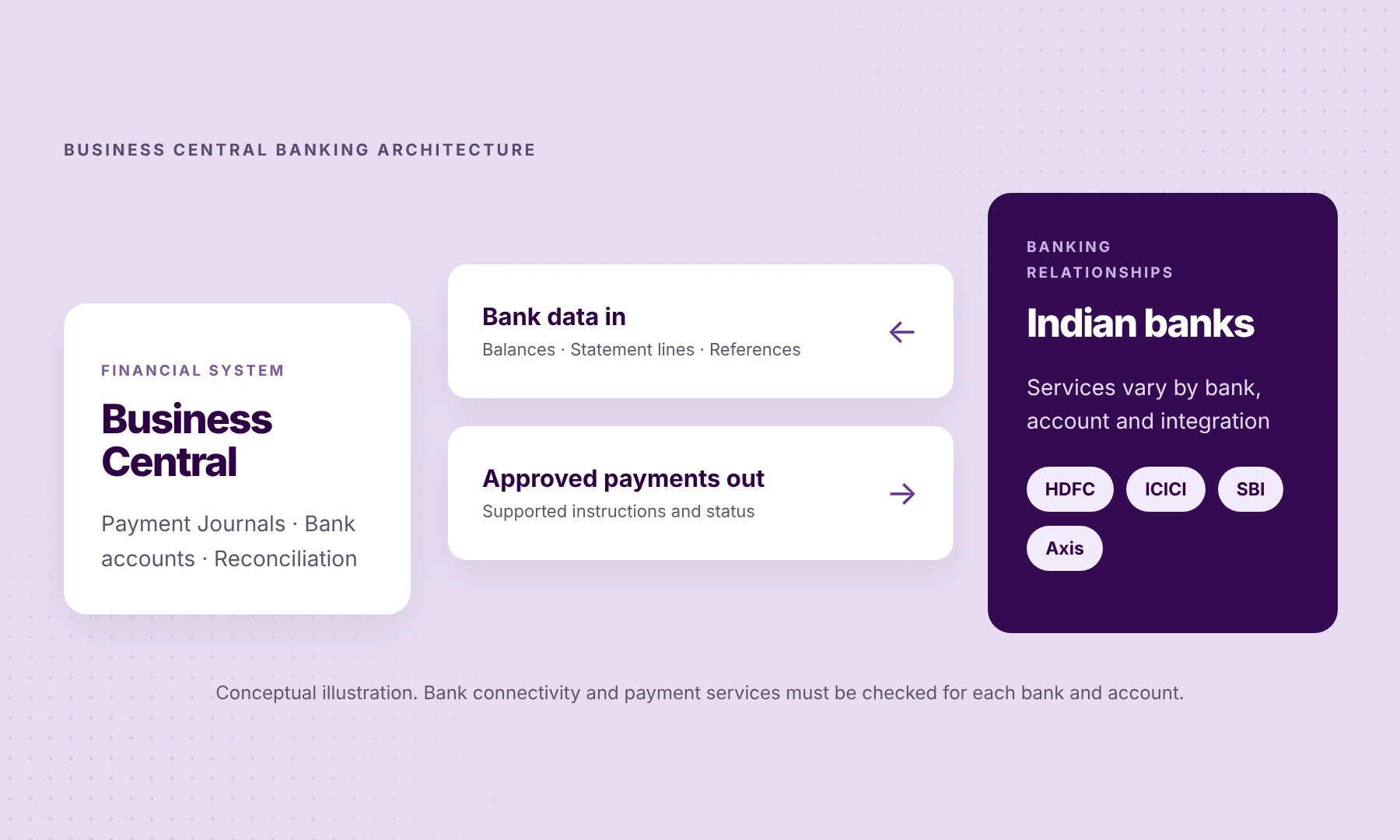
That matters most for businesses with accounts across HDFC Bank, ICICI Bank, State Bank of India and Axis Bank, often in more than one company. The challenge is to keep Business Central’s financial controls while making balances, statements, payment transmission and bank responses less dependent on separate, bank-specific processes.
The essentials
- Business Central already handles payment preparation and bank reconciliation. The gap is how bank data and payment instructions move between the ERP and each bank.
- Microsoft’s standard Yodlee bank feed is supported only in the US and Canada, so Indian implementations need another route: statement imports, bank-specific connections or a banking extension.
- Judge every option account by account: balances, statements, NEFT/RTGS/IMPS payments and the references that come back, not the number of bank logos on a list.
What Business Central already handles
Microsoft Dynamics 365 Business Central isn’t short of banking and reconciliation features. Its banking workflow has four distinct parts.
Bank Account Cards record the bank accounts a company uses and link them to the appropriate general ledger through bank posting groups. They also hold the import and export settings relevant to that account. An ERP implementation should begin with correct account setup, not with the choice of a connectivity vendor.
Payment Journals are used to prepare and record outgoing payments, including vendor payments. Business Central can suggest payments that are due and, when configured with suitable bank formats, generate payment files for bank processing. But generating a payment file does not itself send it to a bank: Microsoft’s documentation describes exporting a bank file that you then upload to your bank for processing.
Bank Account Reconciliation compares imported bank statement lines with Business Central bank account ledger entries. It supports automated matching suggestions, with differences investigated before the reconciliation is completed.
Payment Reconciliation Journals take a related but different approach: incoming bank transactions can be matched and applied against open customer, vendor or other ledger entries. Matching confidence, application rules and review controls matter here; bank connectivity does not replace these accounting decisions.
Together, these capabilities provide a substantial financial workflow. What they do not automatically guarantee is a consistent communication channel to every bank a business uses.
Why Indian bank connectivity requires a closer look
Business Central supports several ways to import bank transactions and export payments. Some depend on country or region, installed extensions and the services offered by the bank. Microsoft’s documentation currently lists its Envestnet Yodlee Bank Feeds integration for Business Central online as supported for banks in the United States and Canada. That doesn’t mean Indian banks can’t connect to Business Central. It means an Indian implementation shouldn’t assume this standard feed will cover its banks. Microsoft’s Yodlee setup guidance sets out that scope, and Microsoft’s banking setup overview lists the other options.
India introduces a practical test of the chosen architecture. One group might receive dealer collections into Axis Bank, pay vendors from HDFC Bank, keep its working-capital facility with SBI and run a subsidiary’s accounts at ICICI Bank. The bank statements, payment authorisations and available status information can differ between those arrangements.
The relevant unit of evaluation is each bank-account-and-service combination, not the number of banks on a provider’s logo wall. Can the account provide the required balances and statements? Can approved NEFT, RTGS or IMPS payments be initiated? What acknowledgement or settlement references come back? Which actions still require approval at the bank?
A good banking integration answers those questions before claiming that the accounts are connected.
The Business Central banking workflow, end to end
A useful way to assess an integration is to follow a payment through its entire lifecycle. A supplier payment may be prepared in Business Central, but three separate events still need to be visible: submission to the bank, the bank’s processing outcome and the booked transaction used for reconciliation.
| Workflow | Business Central | Connectivity | Bank |
|---|---|---|---|
| 01 · Payment instruction out → | Payment Journal Prepare the payment and apply configured approvals | File or approved API request Export/upload or supported extension transmission | Bank receives instruction Applies bank and payment-rail validation |
| 02 · Payment information back ← | Payment monitoring Review processing information and references | Status or bank reference Only where supported by the channel and bank | Bank outcome Receipt/acceptance and settlement are not identical |
| 03 · Bank statement back ← | Bank Account Reconciliation Match entries and resolve exceptions | Statement import or bank feed Map the transaction to the correct bank account | Booked transaction Reported in the bank’s available statement data |
1. Prepare the payment in Business Central
The finance team works with the Payment Journal and its own approval and posting procedures. For a file-based arrangement, an authorised user may then export the payment and upload it separately at the bank. An appropriately configured banking extension can instead transmit supported approved instructions through its connectivity service.
2. Establish what the bank did
Successful export or transmission is not proof of settlement. An acknowledgement may confirm receipt or validation; a subsequent status, transaction record or bank reference is needed to investigate the outcome. These messages are not identical across banks and channels.
3. Bring bank information back into the ERP
Balances and statement lines must reach the correct Business Central bank account. They might arrive by manually imported files, scheduled feeds where supported, or an integrated banking extension. Frequency, format and missing transactions matter more than the label attached to the connection.
4. Match and resolve exceptions
Business Central’s Bank Account Reconciliation and Payment Reconciliation Journal tools then do the accounting work. Finance reviews unmatched lines, incorrect references and timing differences before posting. A connection supplies the inputs; the ERP’s rules and users determine the accounting outcome.
Three approaches to connecting Business Central to Indian banks
There is no universal best method. The right option depends on bank coverage, transaction volumes, how often data is needed and what the finance team already operates successfully.
1. Bank statement imports and payment file exports
A bank can supply statements in a format that Business Central imports. CSV or other supported formats can be mapped using data exchange definitions. Business Central can also export supported payment files. This works, and is often enough for a few stable accounts. But the team remains responsible for collecting files, sending payments and spotting failures wherever those steps are manual.
Business Central also supports the AMC Banking 365 Fundamentals extension, which converts payment files into bank-required formats and prepares bank statement files for import. Payment submission may still require a separate bank upload. Microsoft plans to replace its published extension with an AMC-owned version in 2027. As with any service, check whether it supports the specific Indian banks, accounts and payment types you use.
2. Direct bank connections and existing banking apps
Some enterprises have established bank-specific host-to-host arrangements or local banking extensions. These may be the appropriate choice for high-volume relationships or specialised requirements. The evaluation should include onboarding, data mapping, bank-format changes and maintenance ownership—not just whether the first connection works.
3. A common banking API layer and Business Central extension
A specialist provider can maintain supported bank connections and expose consistent services to an ERP extension. This can reduce repeat integration effort when additional supported banks are added. The trade-off is not zero configuration: account mapping, bank authorisation, payment controls, testing and responsibility for exceptions still need to be agreed.
| Consideration | File-based approach | Bank-specific connections | Common API layer |
|---|---|---|---|
| Statement delivery | Manual or scheduled import, depending on setup | Agreed bank interface | Supported bank data through shared integration |
| Payment submission | Export may still require separate bank upload | Depends on the bank arrangement | Supported approved instructions through the extension |
| Adding another bank | New format and workflow may be needed | Bank onboarding and interface work | Reuse may be possible where the bank and service are supported |
| Main responsibility | Finance/ERP team manages file steps | Enterprise, partner and bank manage interfaces | Provider manages its bank layer; ERP team retains accounting controls |
These options can coexist. A company may retain a proven arrangement for one bank and use a common layer for others.
What OPEN adds to Business Central
OPEN’s Business Central extension provides connected banking across supported Indian banks. Its documented flow brings balances and statement lines into Business Central, sends approved payments through OPEN and returns settled-payment information with bank references. OPEN’s integration page also describes monitoring sync status and retrying failures.
This division of responsibility is important: Business Central remains the system for financial records, payment preparation and reconciliation. OPEN provides bank connectivity for the services and accounts enabled through its extension.
OPEN connects to more than 40 Indian banks, including HDFC Bank, ICICI Bank, SBI and Axis Bank. That is platform coverage, not a promise that every account has identical permissions, payment rails, refresh frequency or settlement-status capabilities. The specific bank accounts and workflows still need to be validated in the proposed deployment.
For an implementation partner, the opportunity is to improve the client’s existing Business Central workflow without rebuilding a separate bank connection for every supported account. For the finance team, the test is simpler: fewer disconnected steps between an approved payment, the bank’s response and a usable entry in the books.
What should you verify before implementation?
Before selecting a connection method, ask the finance owner and Business Central implementation partner to agree on six things:
- Company and account mapping. Which Business Central company owns each bank account, and which Bank Account Card and posting group should receive the data?
- The information needed. Balances, statement lines, refresh frequency, opening/closing balances and missing-transaction handling.
- Payment services. Which accounts require NEFT, RTGS or IMPS initiation, bulk payouts, beneficiary validation and status visibility?
- Approvals and authority. Who approves within Business Central, what the bank must additionally authorise, and how maker-checker requirements are enforced.
- Reconciliation controls. How statement imports map to ledger entries, how matching confidence is reviewed and who investigates exceptions.
- Operational ownership. Who manages onboarding, failed syncs, retries, bank-side changes and post-go-live support?
A useful pilot takes a few representative accounts and follows one approved payment end to end: through to the bank’s outcome, into the statement and reconciled in Business Central. One successful balance refresh is not enough evidence of an end-to-end workflow.
The point is to extend Business Central, not replace its banking logic
Business Central already knows the bills, payment journals and ledger entries. What an Indian enterprise needs is a reliable way to connect that financial system to the banks that hold and move its money.
That is why bank connectivity is best evaluated as an operating process rather than a feature checklist.
The real measure is whether finance can see the cash position, send an approved payment, find out what happened at the bank and reconcile the books. And whether those controls still hold when another account or company is added.
Connect your banks to Business Central without changing your ERP.
Review OPEN’s Business Central extension or discuss your banking setup with OPEN to establish which banks and services fit your environment.
Frequently asked questions
Does Business Central have bank reconciliation built in?
Yes. Business Central offers Bank Account Reconciliation and Payment Reconciliation Journals, with imported statements, matching suggestions and exception handling. Bank connectivity determines how the statement data gets into those workflows.
Can I connect Indian banks using Business Central’s standard bank feed?
Do not assume the standard Envestnet Yodlee feed covers an Indian bank. Microsoft’s documented supported scope for that service is the US and Canada. Indian businesses can evaluate bank statement imports, local banking apps, direct connections or specialist extensions, depending on the bank and requirement.
Does exporting a payment file mean the bank has paid the supplier?
No. Export produces a file for bank processing; separate submission and authorisation may still be necessary. Even after a file is transmitted, acknowledgement and final settlement are distinct events.
Is OPEN a replacement for Business Central’s reconciliation functionality?
No. OPEN’s Business Central extension supplies supported bank data and payment connectivity. Business Central handles the relevant accounting, matching and reconciliation workflows.
Does the same setup work for multiple Business Central companies?
The company and bank-account mapping must be established for each deployment. A multi-company setup should be scoped for account ownership, access, posting groups and appropriate permissions rather than assumed to work identically for every entity.
Ready to connect specific banks? Read How to Connect HDFC, ICICI, SBI and Axis Bank to Business Central Without Separate Bank Integrations for a step-by-step implementation guide.
Technical references
- Microsoft Learn: Set up banking — Business Central banking options
- Microsoft Learn: Envestnet Yodlee bank feeds — supported countries and setup
- Microsoft Learn: Manage and reconcile bank accounts — Bank Account Reconciliation
- Microsoft Learn: Make payments — Payment Journals and payment file export
- Microsoft Learn: Reconcile payments using automatic application — Payment Reconciliation Journals
- OPEN for Business Central — extension capabilities