A manufacturer approves a vendor payment run worth ₹48 lakh on Friday afternoon. The ERP marks the batch as approved. The banking team uploads or transmits the instructions. On Monday, two vendors say they haven’t received their money, three payments show an unfamiliar bank status and the accounts team has already posted the full batch.
Which payments actually went through? Which ones need action? And which entries can finance safely reconcile?
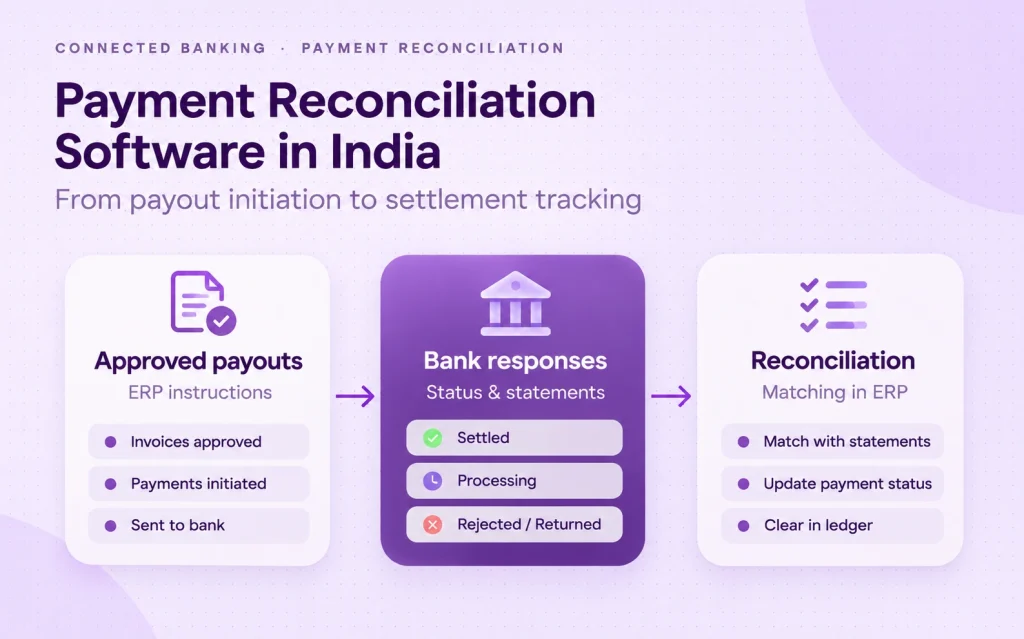
This is the problem behind payment reconciliation software. It isn’t simply about matching a bank statement to a ledger. For companies paying vendors, employees and partners across Indian banks, the more immediate challenge is keeping the entire payout journey visible: from the approved instruction to the bank response, the resulting statement entry and the correct accounting outcome.
This guide explains that journey, what different systems can and can’t confirm, and how an Indian enterprise should evaluate payment reconciliation tools without confusing payment tracking with accounting reconciliation.
At a glance
- Acknowledged isn’t settled: a successful API response or an accepted file doesn’t, by itself, prove the beneficiary has been paid.
- Tracking and reconciliation are different: banking data explains what the bank reported; matching rules and finance review decide what’s posted and cleared in the ERP.
- Evaluate the whole exception path: pending, rejected, returned, duplicate and unmatched payments matter as much as successful payouts.
What does payment reconciliation software actually do?
Payment reconciliation software helps finance teams compare what they intended to pay with what their banks report and what their accounting records show. That can include payout instructions, approvals, bank acknowledgements, transaction references, statement entries, invoices and ledger postings.
In practice, buyers often use one phrase to describe three different jobs:
| Job | The question it answers | Typical owner |
|---|---|---|
| Payment tracking | What happened to each instruction after it left our finance system? | Banking or connectivity layer, using supported bank responses |
| Bank-statement matching | Does a reported bank debit or credit correspond to an expected transaction? | ERP, accounting application or dedicated reconciliation engine |
| Invoice and ledger reconciliation | Which payable is cleared, which remains open and what exception needs investigation? | ERP rules, financial controls and the finance team |
A bank-connectivity layer can supply balances, statements and payment-status data. A reconciliation engine applies matching logic, and an ERP posts and clears accounting entries according to its configuration. Getting data into the ERP doesn’t automatically mean every payment is reconciled.
The payout-to-settlement journey: six checkpoints finance should distinguish
The most useful design starts with a payment’s actual lifecycle rather than a dashboard that shows every transaction as simply successful or failed.
| Checkpoint | What it tells you | What it doesn’t prove |
|---|---|---|
| 1. Prepared | An invoice or payroll item has been included in a proposed payment run. | That the payment has been authorised or sent. |
| 2. Approved | The required maker-checker or delegated approvals have been completed. | That the bank has received the instruction. |
| 3. Submitted | The instruction or payment file has been transmitted. | That the bank has accepted it for execution. |
| 4. Acknowledged / accepted | The bank has acknowledged or accepted the instruction. | That the beneficiary has been credited. |
| 5. Bank outcome | The bank’s status messages show processing, success, rejection, return or another outcome. | That the accounting records have already been matched. |
| 6. Reconciled in books | The bank evidence has been matched to the intended payment and the right ledger or invoice entry. | That all other payments in the batch are complete. |
These distinctions matter most for NEFT, RTGS and IMPS payouts, where banks may return different references and outcome messages. RBI’s NEFT guidance describes tracking payments with transaction details such as a UTR. That reference helps investigate a payment; it isn’t a substitute for the bank’s actual outcome information.
Control rule: Never treat a payout as confirmed settled just because a bank API returned HTTP 200, an upload completed or a UTR appeared. Check the payment outcome evidence available for that bank and payment rail, then apply your ERP’s reconciliation and accounting controls.
Three records that must agree before finance closes a payout
Good reconciliation has a simple underlying test. Can the team follow one business obligation across the originating finance record, the bank’s evidence and the accounting entry?
- The payment instruction: supplier or employee, invoice or pay-run ID, amount, paying entity, account, approval trail and unique internal reference.
- The bank record: the paying bank’s status response, bank transaction reference (such as the UTR), debit date, return information and statement line.
- The finance record: ERP document, supplier ledger, payment posting, matching decision and exception owner.
Matching only on the amount is fragile. Two invoices may have the same value. One invoice may be paid in instalments. A return or bank charge can create an extra statement entry. The design should keep persistent internal payment identifiers and map bank references back to the correct transaction.
For a wider explanation of how these data flows move between banks and accounting systems, see our guide to bank account and ERP integration.
Example: what happens to a bulk payout across three banks?
Consider a hypothetical distribution company making 120 supplier payments from accounts at three banks. By the end of the day, the team has transmitted all 120 instructions. That isn’t the same as saying 120 vendors have been paid.
One payment run. Four different outcomes.
Suppose the bank information at the agreed check time classifies the instructions like this:
- 108 reported as completed by the banks
- 7 still pending or awaiting confirmation
- 3 rejected before completion
- 2 returned after an earlier processing step
The team then finds that 104 of the 108 completed items match the expected entries in the accounting system. Four need investigation because an invoice reference or statement line doesn’t match.
Illustrative example only—not measured OPEN customer performance. Payment-status detail varies by bank and service.
Notice the two separate counts: 108 reported completed by banks and 104 matched in the ERP. A useful dashboard shows both, with timestamps and the remaining exceptions. It doesn’t label the full batch “reconciled” just because all instructions were uploaded.
Seven exceptions that delay payment reconciliation
The value of reconciliation software becomes clearest when things don’t follow the happy path. Finance should test how each system handles these common exceptions:
- Accepted but still pending: the bank has acknowledged the instruction, but there’s no final outcome yet. Keep it in an investigation queue rather than posting it as complete.
- Rejected instruction: an invalid beneficiary, permissions issue or other validation failure prevents processing. Record the reason and require a controlled correction.
- Returned payment: a transaction initially went through but the funds came back. Finance must link the original payment to the related return entry.
- Unknown result after timeout: a response is lost. The system should check whether the original instruction exists before creating a replacement payment.
- Duplicate instruction or file: repeated submission risks paying twice. Unique internal references, idempotency where the bank supports it and approval rules reduce this risk.
- Missing or delayed statement entry: an apparently completed payment doesn’t yet appear in the bank data. Track the bank’s posting cycle and investigate unmatched items.
- Wrong invoice or legal entity: the statement shows a debit, but it’s been matched to the wrong business record. Account, entity and document mapping need review.
For each exception, make someone accountable. An exceptions list without an owner, reason and next action is just another spreadsheet to monitor.
Eight capabilities to evaluate before buying payment reconciliation software
Feature lists often sound similar. Ask vendors to show these capabilities using your own bank accounts, ERP version and payment process.
| Capability | What you should test in a demo |
|---|---|
| 1. Bank and account coverage | Which of your specific accounts and legal entities support statements, payouts and status data? |
| 2. Per-payment status | Can you separate submission, acceptance, pending, rejection, return and completion? |
| 3. Reference continuity | Does the ERP payment ID stay linked to bank IDs, UTRs and statement lines? |
| 4. Statement completeness | Can you detect duplicate imports, missing periods and delayed transactions? |
| 5. Matching controls | What rules exist in your ERP or reconciliation engine for amounts, dates, payees, references and split payments? |
| 6. Exception ownership | Can a reviewer see the reason, responsible person, ageing and next required action? |
| 7. Approvals and audit trail | Can you reconstruct who approved, transmitted, changed and reviewed a payment? |
| 8. Recovery and reporting | What happens when a bank service fails, a status arrives late or an import must be replayed safely? |
Don’t assume all eight are built into a single product. Some belong to connected banking, some to a payment hub and some to your ERP or dedicated reconciliation software. The buying decision should define those boundaries explicitly.
Bank portal, connectivity layer, ERP or reconciliation engine?
A finance team with one bank and a low-volume payment run may be well served by its bank portal and accounting software. A multi-entity enterprise with many banks has a different problem: consistent data and payment responses have to reach the right finance records at scale.
| Approach | Where it helps most | Common limitation to check |
|---|---|---|
| Individual corporate bank portals | Bank-specific approvals, instructions and payment enquiries. | Several banks mean separate views, exports and status formats. |
| Multi-bank connectivity / payment layer | Consolidating statements and payment workflows across banks. | Bank services vary; ERP matching may stay outside the layer. |
| ERP or accounting software | Supplier invoices, ledger postings, matching rules and clearing entries. | Quality depends on timely bank data and correct mapping. |
| Dedicated reconciliation engine | Complex high-volume matching, tolerances, many-to-many transactions and exception workflows. | Still needs dependable source data, implementation and controls. |
Many enterprises need a combination rather than one large replacement project. The right question is: Where are we missing visibility, and where is matching already handled well?
Whichever combination you choose, bank data can reach the ERP through direct APIs, host-to-host files or a connectivity layer. Our guide to corporate banking API integration covers those routes in detail. If a connection doesn’t provide a final confirmation event, the dashboard should say so: it’s safer to show awaiting confirmation than to invent a definitive “settled” status.
See your payouts and bank statements in one connected workflow.
Tell us the banks, accounts and ERP you use. OPEN can help assess payment visibility, statements and the right integration path for your finance team.
A practical 30-day pilot for finance and IT
Don’t start by migrating every account or rebuilding the general ledger. Select one entity, two or three authorised bank accounts and a payment category that creates repeated reconciliation work.
- Week 1 — map the process. Identify the ERP, bank accounts, number of monthly payments, approval owners, current statement source and the exact points where a payment loses visibility.
- Week 2 — connect and validate data. Test account access, statement availability and payment references. Compare the returned information with records from the banks.
- Week 3 — run controlled payment scenarios. Test success, pending, rejection and an uncertain response. Check who can initiate, approve, recheck and retry each instruction.
- Week 4 — reconcile and review exceptions. Validate sample statement-to-payment matching inside the ERP or your reconciliation engine. Document gaps, ownership and the rollout decision.
Agree measurements before you begin: the share of payment instructions with a traceable reference, the share with a confirmed bank outcome, the time to investigate a pending payout, unmatched statement entries and manual banking-portal effort. These measures are more useful than an unverified promise of “100% automatic reconciliation”.
Where OPEN Money fits: banking connectivity, not a replacement for your ERP
OPEN Money Connected Banking brings balances, bank statements and payment workflows together on a platform that connects with 40+ Indian banks. Payments go out from your existing accounts, within each bank’s enabled services.
For supported payout services, that means one place to initiate payments, view available bank responses and pull statements, instead of switching between bank portals. OPEN also lists ERP and accounting integrations for systems including Business Central, NetSuite, SAP Business One and Oracle Fusion Cloud ERP.
The distinction matters: OPEN provides banking connectivity and payment visibility. Your ERP or reconciliation system stays responsible for accounting logic, matching rules, invoice clearing and finance sign-off.
A meaningful pilot should therefore show both sides of the hand-off: what OPEN can provide from the bank, and how the finance system consumes, matches and reviews that information. If you’re comparing individual bank portals with a unified approach, our corporate internet banking versus connected banking guide explains the operational trade-offs.
Frequently asked questions
What is payment reconciliation software?
It’s software that compares intended payments, bank evidence and accounting records so finance can identify matched transactions and exceptions. Some platforms provide tracking and bank feeds; others perform the actual matching and ledger updates.
Is a payout successful once a UTR is generated?
Not necessarily. A UTR helps trace the payment, but what counts as final confirmation depends on the bank and payment rail. Check the bank’s outcome before closing the item.
Does a bank API automatically reconcile vendor payments?
No. Bank APIs can provide statements, transfer instructions and payment statuses. ERP or reconciliation software applies the matching rules, while finance reviews exceptions and confirms the accounting treatment.
Can payment reconciliation software work across HDFC, ICICI, SBI and Axis Bank?
Multi-bank platforms can connect accounts across these banks, but statement, payout and status capabilities need checking account by account. Not every bank returns the same status detail.
What happens when a payment is pending or returned?
It should stay visible with its original instruction, bank reference, reason and action owner. A return may need separate statement matching and invoice treatment. Retrying without checking the original instruction can create duplicate payouts.
Do we need to replace our ERP to improve payment tracking?
Usually not. A banking connectivity layer can add bank statements and payment information to existing workflows. Your ERP can continue to own invoice matching, ledger posting and accounting controls.
Track the payment. Reconcile the record.
A payout isn’t one event. It’s a sequence of decisions, bank responses and accounting entries. The right system keeps those steps distinct, keeps references intact and puts exceptions in front of the people who can resolve them.
For Indian businesses working across multiple banks, the strongest approach usually isn’t to replace every finance tool. It’s to connect the banking evidence to the workflow that already owns approvals and accounting, then test what happens when a payment is late, rejected, returned or simply not yet confirmed.
Want to make multi-bank payouts easier to follow?
Share your payment workflow, banks and ERP. We’ll help you review banking connections, statement access and payout-status visibility before you plan an integration.
Sources and further reading
- OPEN Money Connected Banking — banking use cases and account connectivity.
- OPEN ERP integration directory — supported ERP and accounting environments.
- Reserve Bank of India: NEFT FAQs — fund-transfer process and payment tracking references.
- OPEN: Bank account and ERP integration — related implementation guide.
- OPEN: Corporate banking API integration in India — architecture and pilot guide.