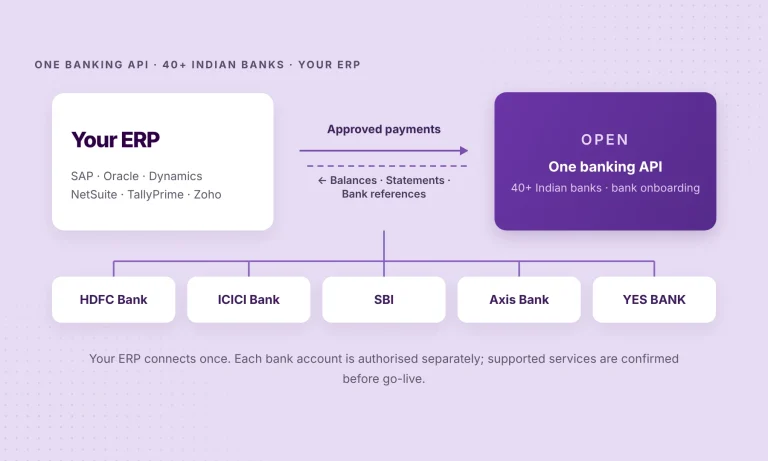
Consider an Indian business with 15 current accounts spread across HDFC Bank, ICICI Bank, SBI, Axis Bank and YES BANK. Its finance team works in SAP to manage vendors and books, but bank balances, statement files and payment confirmations may arrive through separate channels. Before treasury can decide which account should fund today’s payments, someone must bring those pieces together.
The issue is not necessarily that its ERP or banks lack functionality. It is that the information and payment instructions have to cross the boundary between them. A bank account–ERP integration makes that connection more dependable—and banking API integration through a shared layer can reduce the need to engineer the same exchange separately for every supported bank. That is what OPEN Money offers: one API for 40+ Indian banks.
At a glance
- Keep your ERP and existing banks. Connect the workflows between them.
- Use a common API layer where it reduces repetitive bank-specific work.
- Validate the actual bank, account, ERP and service combinations.
Why does banking still sit outside the ERP?
ERP systems already manage much of the financial process: a vendor invoice is reviewed, approved and recorded; a payment instruction is prepared; entries are posted to the ledger. But the bank is still the system that holds the funds and processes the transfer.
Where those systems are not connected, finance teams may face three recurring handoffs:
- Before a payment: checking available balances across banks and entities to decide which account to use.
- During a payment: moving instructions from an approved ERP workflow into a bank portal or payment file, then monitoring rejections and processing updates.
- After a payment: retrieving bank transactions and matching them against ledger entries, with exceptions investigated separately.
A good integration is meant to reduce those handoffs. It does not make the ERP a bank, nor does it mean every transaction is automatically reconciled.
What is bank account–ERP integration?
Bank account–ERP integration connects the finance workflows in an enterprise resource planning system with the information and services available from its banks. The connection may use corporate bank APIs, secure file exchange or an integration provider, depending on the bank and the business requirement.
The distinction between moving information and moving money matters. These are related workflows, but they are not the same operation.
| Workflow | What crosses the boundary | Where the work is completed |
|---|---|---|
| Balance visibility | The latest available account balance | Finance reviews cash in the ERP or connected dashboard |
| Bank statements | Transaction and statement lines | The ERP imports, maps and processes accounting entries |
| Payment initiation | An approved payment instruction | The bank validates and processes it under its rules |
| Payment responses | Supported acceptance, rejection or settlement references | Finance tracks the payment and resolves exceptions |
| Reconciliation | Bank information alongside existing ERP records | The ERP’s matching rules and finance team reconcile the records |
A submitted payment is not necessarily a settled payment. A bank may acknowledge receipt before processing is complete. Similarly, importing a statement does not, by itself, reconcile every transaction. Those distinctions should be explicit when an integration is designed.
Three ways companies connect their banks to an ERP
There is no universally best connection model. The right choice depends on the banks involved, the services required and the enterprise’s existing technology.
1. Bank-by-bank API integrations
The ERP or its middleware connects to individual banks through their corporate APIs. This can be appropriate when a company has a small number of stable banking relationships and the necessary development resources. Each bank may have different authentication, request formats, limits and operational processes, so adding another bank may require more engineering and testing.
2. Host-to-host and file-based exchange
Some enterprises use SFTP or other established host-to-host channels to send payment files and receive statements. These arrangements can work well, particularly for high-volume relationships that already have mature controls. Their limitations are usually operational rather than conceptual: bank-specific formats (such as MT940 or ISO 20022 camt.053 statements), schedules, exception handling and ongoing maintenance.
3. Banking API integration through a common layer
A provider maintains connections to supported banks and exposes a reusable interface to the ERP or integration middleware. This can reduce repeated bank-specific development while allowing an enterprise to retain its existing bank accounts and financial system.
It does not eliminate bank authorisation, ERP-side configuration, approval design or testing. Nor does every supported bank necessarily offer identical statement, balance, payment and status services.
| Decision point | Direct bank APIs | Host-to-host / file exchange | Common banking API layer |
|---|---|---|---|
| Integration work | Individual bank interfaces | Bank-specific files and channels | Reusable interface for supported services |
| Good fit | A few strategic banks | Established high-volume arrangements | Multiple supported banks and repeatable workflows |
| Main consideration | Development and maintenance per bank | File timing, formats and operational monitoring | Actual bank/service coverage and provider dependencies |
An enterprise can use more than one model. Existing host-to-host connections need not be replaced simply because an API-based option becomes available.
One API for 40+ Indian banks: where OPEN fits
| Layer | Role | Examples |
|---|---|---|
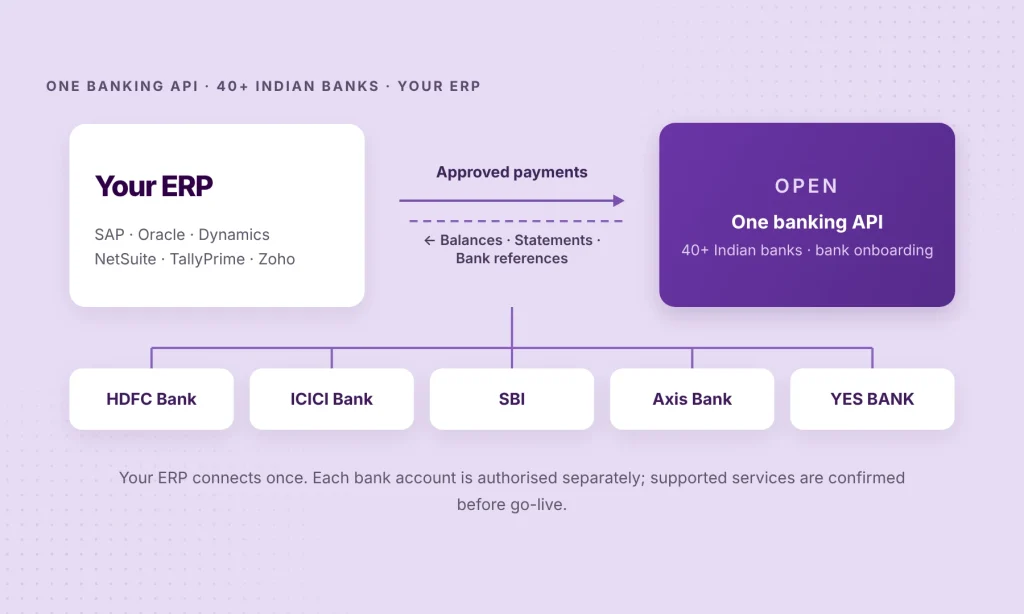
| Your ERP | Finance system: approvals, payments and accounting | SAP · Oracle · Dynamics · NetSuite · TallyPrime |
| OPEN Money | Common API layer: supported bank connectivity and service mapping | Balances and statements in · approved payments out |
| Your banks | Hold the funds, process payments, supply statements | HDFC Bank · ICICI Bank · SBI · Axis Bank · YES BANK |
OPEN Money provides a common banking connectivity layer across 40+ Indian banks, including HDFC Bank, ICICI Bank, State Bank of India, Axis Bank and YES BANK. For supported workflows, OPEN’s bank connections can make balances and statement information available to the ERP and support the transmission of authorised payment instructions. The business retains its own bank accounts and ERP.
Instead of creating and maintaining separate ERP-side connections for every supported bank, an enterprise can evaluate a common interface. That can make expansion more manageable when additional banks or entities are added.
But “40+ banks” describes the platform’s overall coverage—not a promise that every service is available for every account. The right way to evaluate an integration is by bank, account, service and ERP environment. A balance feed and a payment initiation service may have different permissions and onboarding requirements.
OPEN offers integrations for several platforms, including SAP Business One, Oracle NetSuite, Oracle Fusion Cloud ERP, Microsoft Dynamics 365 Business Central and Finance & Operations, TallyPrime, Zoho Books, Odoo Enterprise, ERPNext, Marg ERP and Busy. The form of integration varies: add-on, extension, module or scoped integration. For other environments and versions, an API-led implementation may need to be designed and tested.
Explore OPEN’s ERP integrations or review the Connected Banking enterprise API documentation to understand the available interfaces.
One API for 40+ Indian banks, inside the ERP you already use.
Tell us your ERP, banks and the workflows you want to connect. We’ll help establish what is supported and where a pilot should start.
What changes for the finance team?
A clearer cash position before making payments
When balances across supported accounts can be viewed together, treasury has less need to collect figures from separate portals before planning a payment run. This is particularly useful for multi-entity businesses where the available balance and the account authorised to pay may sit with different teams.
Fewer manual steps between approval and payment
An approved vendor payment in the ERP can be passed to a supported bank-payment workflow without re-entering the same details elsewhere. That reduces handoffs, while bank permissions, maker-checker controls and any required authorisation still apply.
Better inputs for reconciliation
Bank statement lines can reach the ERP in a structured way, ready for its matching and posting logic. Finance teams can spend more time resolving unmatched items rather than collecting and reformatting files. The level of automated matching depends on the ERP configuration and the quality of available bank data.
Faster month-end closing
When bank transactions reach the ERP more often, reconciliation can happen through the month instead of piling up at the end. That leaves fewer outstanding items for the team to investigate during month-end close.
Less work when banking relationships change
Adding a bank should not automatically require rebuilding an entire ERP integration. If the bank and the required services are already supported by the connectivity provider, the existing interface may be reusable. Account authorisation, service activation and testing are still required for the new arrangement.
Why the ERP environment still matters
The business outcome may be similar across ERPs, but the implementation is not interchangeable. Each platform has its own payment objects, bank-account setup and reconciliation controls.
- SAP: Consider the specific landscape. SAP Business One add-ons and integrations for SAP S/4HANA or ECC involve different implementation paths. Our SAP multi-bank connectivity guide explains the architectural options.
- NetSuite: Bank Feeds, statement imports, Electronic Bank Payments and reconciliation are distinct capabilities. Read the NetSuite bank connectivity guide for the India-specific considerations.
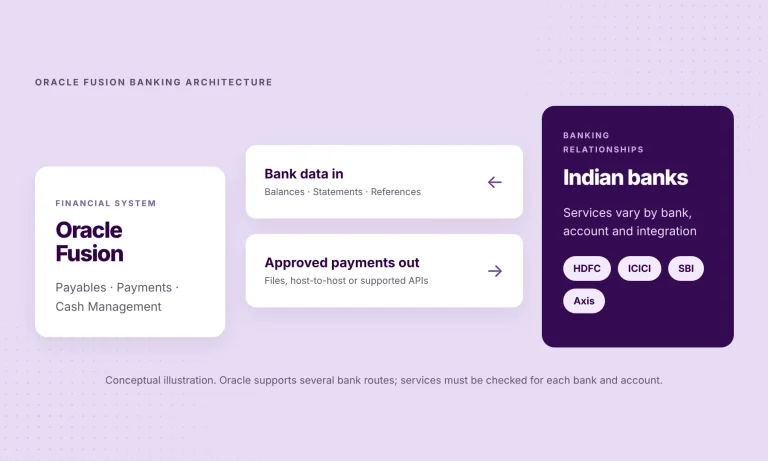
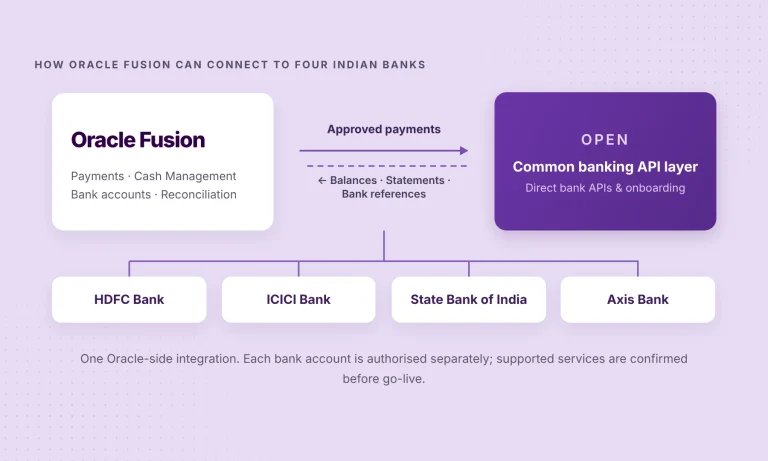
- Oracle Fusion Cloud ERP: Oracle Payments and Cash Management remain responsible for their configured workflows; the connection must deliver the bank services and data those processes require. See the Oracle Fusion bank connectivity guide.
- Microsoft Dynamics 365: Business Central and Finance & Operations have different extension models and reconciliation processes. They should not be treated as one generic Dynamics integration. Our Business Central bank connectivity guide covers the Indian context.
- TallyPrime, Zoho Books, Odoo and other mid-market systems: The implementation depends on the supported product, edition, module and the required accounting workflow.
This is why an ERP banking integration should be specified around the actual environment, not just the ERP brand name.
How to connect your bank accounts to an ERP
A practical implementation should start with a limited, testable set of outcomes—not with a promise to connect every bank at once.
1. Map your systems and accounts. Identify the ERP product and version, legal entities, banks, account types and existing bank interfaces. Record which current processes already work well.
2. Define the services. Separate balance checks, statement retrieval, payment initiation, available bank responses and reconciliation. Agree how often each service needs to run and what finance should see when something fails.
3. Choose the integration path. Determine whether an existing OPEN ERP integration covers the requirement or whether an API implementation must be scoped. Confirm who owns ERP mapping, approvals, monitoring and support.
4. Complete bank permissions and configuration. Obtain the required bank authorisations and set up account access, user roles and payment controls. Read-only data access and payment permissions should be evaluated separately.
5. Pilot before expanding. Begin with a small set of accounts and one meaningful workflow. Verify balance accuracy, statement coverage, payment acknowledgements where supported, settlement evidence and exception handling. Then extend to more banks and entities.
The pilot should prove not just that information can be exchanged, but that the finance team can trust the process after go-live.
Six questions to ask before selecting an integration
- Which banks and account types are in scope, and which specific services are available for each?
- Will the business use an existing ERP connector, custom middleware or both?
- Where do payment approvals live, and what additional bank authorisation is required?
- Which response confirms receipt, rejection or settlement—and which of those is actually available?
- How will the ERP match bank transactions, prevent duplicates and handle exceptions?
- Who monitors failures, manages access changes and supports new banks after implementation?
These questions are more useful than judging an integration by the number of bank logos in a diagram.
Frequently asked questions
Can I connect bank accounts from more than one Indian bank to the same ERP?
Yes, where the banks, accounts and services are supported by the chosen integration. OPEN’s platform connects accounts across 40+ Indian banks, but eligibility and available features should be confirmed for each banking relationship.
Do I need a separate technical integration for every bank?
Not necessarily. A common banking API layer can let an ERP reuse an interface across supported banks. Each account may still require onboarding, consent and bank-specific permissions.
Will I need to replace my ERP or move my bank accounts?
No. The objective is to connect existing systems. Implementation work may still be needed for the ERP version, approvals, accounting mapping and monitoring requirements.
Does bank–ERP integration automatically reconcile transactions?
Not on its own. The integration supplies supported bank data; the ERP’s matching and posting rules perform reconciliation, with exceptions reviewed by the finance team.
Can payments be sent directly from the ERP?
Supported integrations can transmit authorised payment instructions from ERP workflows. The available payment rails, approval steps and outcome messages depend on the bank, account permissions and specific implementation.
Is this the same as India’s Account Aggregator framework?
No. This article concerns corporate banking connections and ERP workflows. RBI’s Account Aggregator framework is a separate consent-based financial information-sharing ecosystem; the two should not be treated as interchangeable.
Banking should work with the ERP your business already uses
An ERP can give finance a reliable view of what has been approved and recorded. Bank connectivity helps close the loop on what is available, what has been sent and what has actually happened at the bank.
The advantage of one banking API layer is not that it removes every implementation step. It is that it can reduce repeated integration work across supported banking relationships while keeping the ERP, the banks and the business’s existing controls in place.
Connect your bank accounts to your ERP.
Share your ERP environment, bank list and the workflows you need. OPEN can help assess supported services and a sensible place to begin.
Product & technical references
- OPEN Money — Multi-bank connectivity — bank coverage and service overview
- OPEN Money — ERP integrations — supported ERPs and integration types
- OPEN Money — Connected Banking enterprise APIs — balances, statements and fund transfers