It’s the third working day of the month, and the finance team is still reconciling bank accounts. The ledger is ready, but statements have arrived at different times. Some transactions match immediately; others need checking for bank charges, outstanding cheques or payment references that don’t line up.
Now imagine the business has 12 current accounts spread across five banks and three legal entities. Reconciliation is no longer one exercise. It’s a collection of account-by-account tasks, each with its own files, cut-off dates and exceptions.
Bank reconciliation software can reduce that manual work, but only if it solves the right problems: reliable bank data, matching rules, exception management and a clear record of what has been reviewed. Here are nine capabilities Indian finance teams should evaluate before buying.
At a glance
- Bank feeds and matching are different capabilities. A tool may retrieve statements without reconciling them.
- Evaluate exceptions, not just auto-match percentages. Unmatched transactions are where finance teams spend their time.
- Test with your actual banks and ERP. Coverage, refresh cycles and posting capabilities vary.
What bank reconciliation software actually does
Bank reconciliation compares the transactions recorded in a company’s accounting or ERP system with the transactions reported by the bank. The aim is to explain every difference and make sure cash records are complete and accurate.
For example, a bank statement shows a ₹5,023.60 debit while the ledger contains a ₹5,000 supplier payment. The ₹23.60 difference could be a ₹20 bank charge plus 18% GST, a recording error or an entirely different transaction. Reconciliation should help the reviewer find the cause, not simply label the entries as matched.
A complete reconciliation workflow brings together bank statement data, ledger or subledger records, matching rules, exception review and evidence for sign-off. Some ERPs already offer parts of this natively. Separate reconciliation software can add depth for high-volume or multi-entity businesses.
9 capabilities to evaluate in bank reconciliation software
1. Coverage for your actual Indian banks and accounts
Start with your bank inventory, not a vendor’s logo grid. List every bank, legal entity, account type and required service. Then ask which accounts can supply usable statements through an API, a direct connection or a standard file format.
A vendor may offer balances at a bank but not every statement field or historical period. Ask for a bank-by-bank capability matrix and confirm which accounts will still need manual uploads.
2. Reliable statement collection and completeness checks
A matching engine can’t reconcile transactions that never arrive. Check how statements are collected, how often data is refreshed, whether backdated entries are included and how missing periods are flagged. Our guide to corporate banking API integration explains how statement feeds reach an ERP.
The system should make duplicate-file uploads, interrupted feeds, overlapping date ranges and delayed postings visible. Ask the vendor to reconcile two consecutive months with one statement day deliberately missing.
3. Flexible transaction matching rules
Simple one-to-one matching by amount and date is useful, but it’s rarely enough. Finance teams deal with consolidated deposits, several invoices paid together, partial settlements, bank charges and references in inconsistent formats.
UPI collections are a useful test. A business may receive hundreds of transactions, while its accounting system records consolidated settlement entries. Matching those amounts can require settlement references, fees, refunds and transaction-level information. Look for configurable one-to-one, one-to-many and many-to-one rules where your actual workflows need them. Matching tolerances should be controlled, reviewable and documented, not a silent way to accept discrepancies.
4. Clear exception management
The most useful dashboard is often the one that explains what did not match. Reviewers need to separate timing differences from genuine errors, then assign each exception to an owner with notes and supporting evidence.
Test whether the system tracks aged items, missing ledger entries, returned payments, duplicate transactions and unposted charges. A report that only says “unmatched: 38” isn’t enough for month-end control.
5. ERP and accounting-system integration
Bank data and ledger data have to meet somewhere. Confirm compatibility with the exact ERP version and modules your company uses, whether that’s SAP, Oracle, NetSuite, Business Central, TallyPrime or another accounting system.
Ask whether the software only exports statements, imports ledger records, proposes journals or also posts approved adjustments back to the ERP. These are distinct levels of integration, each with different implementation and control requirements. For the wider picture, see why finance teams are integrating bank accounts with their ERP.
6. Multi-entity and account-level controls
An enterprise with separate legal entities can’t treat all its accounts as one cash ledger. Look for correct bank-to-entity mapping, account-specific permissions, currency handling where it applies and separate reconciliation sign-off by entity.
For group reporting, a consolidated view is only useful if a reviewer can still drill down to the right account, date range and underlying transaction.
7. An auditable review and approval trail
A reconciliation should be reproducible. The system should show who changed a matching rule, who manually overrode a match, who approved an adjustment and when a reconciliation was closed.
Ask to export evidence for an auditor: statement source, transaction references, matched ledger entries, exceptions, explanations and reviewer sign-off. Role-based permissions and separation of duties matter as much as a clean-looking dashboard.
8. Status, timing and payment-reference visibility
An initiated payment isn’t necessarily a settled payment. Reconciliation gets harder when the ERP payment reference, the bank transaction reference and the eventual statement line are disconnected.
Check whether the tool keeps useful references such as UTRs when banks provide them, distinguishes transaction states and handles settlement-date differences. Payment-status tracking and bank reconciliation are complementary tasks, not the same one. Our payment reconciliation guide explains the difference in more detail.
9. Reporting that helps the finance team close the books
Beyond a completion percentage, the system should show reconciled and unreconciled balances, the number and age of exceptions, accounts still awaiting statements, unresolved adjustments and progress by legal entity.
Ask to see a month-end report a Finance Controller could use without rebuilding it in Excel. Reports should separate operational activity from confirmed accounting outcomes.
The nine capabilities: a practical vendor checklist
| Capability | What to request in the demo |
|---|---|
| Bank coverage | Evidence for your specific accounts and enabled services |
| Statement completeness | Missing dates, duplicates, late postings and historical range checks |
| Matching rules | Examples of one-to-one, grouped and partial matches, including UPI credits |
| Exceptions | Assigned owners, ageing and supporting evidence |
| ERP integration | Actual field mapping and posting behaviour |
| Multi-entity controls | Entity mapping, permissions and per-account drill-down |
| Audit trail | Rule changes, manual overrides and sign-off history |
| Reference continuity | Ledger ID, bank reference and status handling |
| Close reporting | Reconciliation balance, unresolved items and ageing |
An example: reconciling 12 bank accounts at month-end
Consider a hypothetical Indian manufacturing group with 12 accounts across five banks. Three people maintain the accounting records, and one controller signs off the month-end bank reconciliations.
In a manual process, the team collects statements, checks date ranges, reformats files, matches transactions to the ledger and chases the remaining items. The bottleneck is usually one of three things: a late statement from one bank, a bulk vendor payout with multiple references, or a bank charge that was never posted in the ERP.
With a connected workflow, statements arrive in one place, matching rules run in the reconciliation system and unresolved transactions go to a reviewer. On day three, the controller’s view might look like this:
- 9 accounts fully reconciled and ready for sign-off
- 2 accounts waiting on a delayed statement
- 1 account with 14 open exceptions, mostly unposted bank charges and one returned payment
Instead of asking “are we done?” across 12 spreadsheets, the controller knows exactly which three accounts need attention and why.
Bank statement connectivity vs reconciliation software: where each layer fits
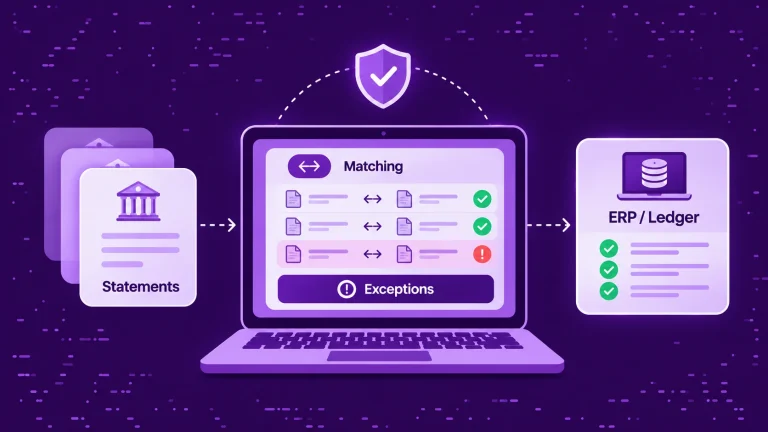
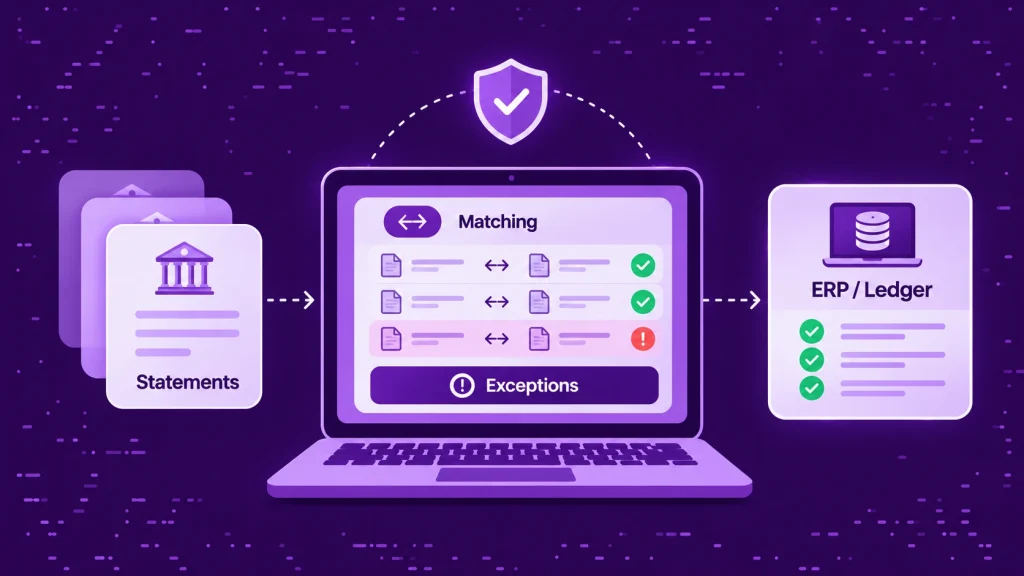
The two are often sold together, but they solve different problems. A banking connectivity platform supplies balances, statement transactions and payment information. A reconciliation engine compares those records with accounting data, applies matching rules and manages unresolved items.
| Question | Bank connectivity layer | Reconciliation engine / ERP |
|---|---|---|
| Can it retrieve bank transactions? | From supported connected accounts, subject to available statement services | May ingest feeds or imported files |
| Does it match bank entries to ledger entries? | Not by itself | Yes, if matching is part of the product |
| Does it handle exceptions? | May flag missing or delayed bank data | Typically manages unmatched ledger and bank items |
| Can it post journals? | Only through an ERP integration | Depends on the system and approval setup |
| Can it provide reconciliation sign-off? | Not through connectivity alone | Needs review, evidence and approval features |
For companies already using an ERP reconciliation module, improving statement delivery may be worth more than replacing the matching engine. For others, complex rules, high volumes or stronger close controls may justify a dedicated reconciliation platform. Our guide to choosing cash management software covers the wider treasury view.
How OPEN Connected Banking can support the process
OPEN Connected Banking provides access to supported balances and statements across its network of 40+ Indian banks. It also offers integrations for TallyPrime, SAP Business One, Oracle, NetSuite and Microsoft Dynamics 365 Business Central, helping businesses bring banking information into their existing finance workflows. Available services depend on the bank, account and specific ERP integration.
In a reconciliation workflow, OPEN’s role is getting reliable bank data to the system that owns your ledger. This can reduce the need for separate bank-portal downloads and give the ERP or reconciliation system more consistent data to work with.
Important distinction: connecting an account doesn’t by itself mean automated ledger matching, journal creation or reconciliation sign-off. Those depend on your ERP or reconciliation application and how the integration is configured. Services also vary by bank and account, so ask for a demonstration using your own banks, ERP and reconciliation scenarios.
What if your statements arrived without the daily portal chase?
See how OPEN can bring supported bank statement data from multiple accounts into your finance workflow, so your team can focus on matching and exceptions.
How to evaluate software without buying more than you need
- Inventory your accounts: banks, entities, transaction volumes and existing statement channels.
- Map your current process: who downloads files, who matches items and who signs off.
- Choose representative test cases: missing statement days, bulk payments, UPI credits, bank charges, partial matches and returned transfers.
- Confirm ownership: decide whether the bank-data layer, the ERP or the reconciliation engine is responsible for each step.
- Pilot before rollout: compare reconciliation outputs against a verified manual control period and record any remaining exceptions.
When comparing vendors, ask for the total implementation scope rather than just the subscription price: account connectivity, connector setup, historical data, custom matching rules, support and the effort needed to keep feeds running.
Frequently asked questions
What is bank reconciliation software?
It compares bank transactions with entries in your accounting or ERP records, identifies mismatches, manages exceptions and keeps evidence that the accounts have been reviewed.
Can bank reconciliation be automated across multiple Indian banks?
Much of it can, once usable statements and ledger records are available. How much depends on bank coverage, data quality, matching rules and the ERP or reconciliation software you use.
Is payment reconciliation the same as bank reconciliation?
No. Payment reconciliation follows an individual payment from initiation to the bank outcome, while bank reconciliation compares statement activity with accounting records. The two share transaction references and bank data.
Does an ERP already include bank reconciliation?
Many ERPs and accounting applications have built-in bank reconciliation. Review what your existing system already does before buying a separate reconciliation engine.
Can OPEN automatically reconcile every bank transaction with my ERP?
OPEN provides the multi-bank connectivity and ERP integration that feed reconciliation. Automatic matching, accounting adjustments and sign-off depend on your ERP and implementation, so confirm them for your setup.
The right solution starts with reliable bank data
The best bank reconciliation software for your business isn’t necessarily the one with the longest feature list. It’s the one that handles your accounts, matching scenarios and exceptions with dependable data and a controlled review process.
For Indian finance teams working across multiple banks, start by checking whether statements can be collected consistently and delivered to the system that already owns the ledger. Then decide how much extra matching, exception management and close automation you actually need.
Still collecting statements from multiple bank portals?
Explore how OPEN can bring supported bank balances and statement data together across your existing accounts, ready for your ERP’s reconciliation workflow.